Important! Exodus by the End of October 2026, sayeth The Lord your God.
* Though this post is focused on marketing your blog, the notes posted below are crucial. Therefore, be sure to read them all. *
In Preparation for the Exodus and Thereafter, You Should Make a Blog. Get Prepared and Be Sure to Exodus.
No matter what remote profession we’ve chosen, we should all have a blog, whoever is able to create one, at least one, as a way to earn a remote income. Be sure to Exodus by the End of October 2026, whether to a foreign territory (one of those that are approved by God) or out of the cities to the countrysides. The exodus posts from the social media platforms will eventually be posted onto this blog/website over time. For now, you can read them directly on the social media platform, at the accounts that are still present, not having been deleted by the platform, at least not yet, like other accounts have been. Read the posts at the following Bluesky pages. @ExodusTravelsNMT: bsky.app/profile/exodustravelsnmt.bsky.social and @BewareofTheNarratives: https://bsky.app/profile/bewareofthenrtvs.bsky.social. (Visit also YouTube channel “BewareoftheNarratives” to watch the main playlists, if you haven’t already done so. Read the bio of the channel first. Be sure to watch the latest playlists, “The Economy,” “Be a Blogger,” and “Natural Remedies.” Watch also the playlists “Cool or Weird” (this one watched in reverse chronological order, at least read the titles in reverse chronological order) and “Weird Times.” It’s important that you read the bio of the channel first, because there’s information there that you need to know. For the playlists, it’s okay to watch the videos partially (a few minutes or skipping around, etc). Just be sure to get the general information. https://www.youtube.com/@bewareofthenarratives
We’re in The End Times.
The stability of this blog is generally okay, but you can screencapture the information, print it, or copy and paste it in a text document if you want to. For the social media posts, there’s no telling if they’ll remain there. Therefore, be sure to screencapture the social media posts if you haven’t already. So you understand, we’re in the End Times, just as it was before The Great Flood. The angels, along with the Reptilians and the aliens are attacking us, trying to corrupt all the humans, just like before The Great Flood [with the exception of Noah, who they left alone only because God had told them that if everyone gets corrupted, they (the angels) will be killed]. Ephesians 6:12. John 14:6. Let other persons know of what is happening. Tell your fellow man these messages, telling them to prepare and exodus. It’s crucial that you tell people, because this information is being suppressed, and they may not find out otherwise or in time for the exodus’s deadline.
Apply for Financial Benefits if You Need Them.
In the communes of the countrysides, low income housing units will be provided for those who stay in America. The countrysides of America (in the Northern States) will be the Safe Zones, and God will provide guards to protect the people. However, understand, the angels do not listen. Therefore, the Safe Zones may eventually get breached, which means people there will have to fight. Overall, it’s better to leave the country to the approved foreign nations. Read the posts at the above social media pages for more details. For finances, if you need any financial assistance, apply for government benefits. They're being protected by God. Apply for them, and be diligent in receiving them. It all belongs to God. If it wasn't for Him, no one would even wake up in the morning. So, if you need them, apply for them. For emergency food, while you wait, go to your local food banks. For financial assistance, you can also apply for a distance learning degree, along with financial aid, but you have to apply quickly because once you’re out of the country, you’ll be considered a foreign student and may not qualify. If you apply as a “full time” student, you’ll get enough to pay for your education and also your living expenses. Time is going; apply as soon as possible. All of this has been said already, but accounts were removed, and posts were deleted. It’s being said again.
Follow God’s Instructions.
Take it all seriously, all of the information given to you, because it is indeed quite serious. Follow these instructions and others that have been posted, including at the links mentioned above. Follow and keep following Jesus Christ. He’s Our Lord and Savior. He’s Our Lord and Shepherd. He’s King and The Almighty God by inheritance. Understand that; it’s all facts. Read your Bibles, and for answers to Bible questions, visit and search GotQuestions.org. Do not do any witchcraft at all (no spells at all, no requests from the angels at all). Otherwise, you’ll be considered “corrupt” and will go to Hell. They’re trying to corrupt everyone, including by getting them to do witchcraft. So, don’t do it. That’s it for now. Keep your hope and faith in The Almighty God, including in Our Lord and Savior Jesus Christ. Be and stay blessed. Do not become corrupt. Remain good-hearted. Then, you’ll stay blessed. Pray for Humanity, in Jesus’s name. (Pray for peace and justice.)
Make a Blog, and the Following Listed Below Are 25 Excellent Ideas for Bloggers (for Promoting Your Blog).
Why everyone should be a blogger, no matter what other source of income you pursue: If you haven’t already done so, watch the YouTube playlist “Be a Blogger,” and be sure to read the description of the playlist; much information is posted there. I’ll later repost that information on this blog. For now, you can read it over there if you haven’t already done so. Watch also the playlist “Small Biz Solutions” for recommendations.
First, Before Reading About the 25 Marketing Ideas, Know The Importance of SEO.
Even though SEO is not so reliable these days with search engine algorithms changing and several other problems (content suppression, etc.), it’s still useful for finding your blog on other platforms, such as for RSS Feed Directories. Therefore, always be sure to use SEO strategies for your blog posts. Research “how to write a blog post,” and “how to optimize a blog post for SEO.” Here’s a great article from WordPress: “How to Write a Blog Post: A 14-Step Blueprint for Excellent Content.” https://wordpress.com/blog/2025/03/04/how-to-write-a-blog-post.
Note: This post is not optimized for SEO. Frankly, there’s no time for that for this particular blog, being that posting the information as soon as possible is what’s most important. Do study about how to write a blog post with SEO. The purpose of this blog is to get the information out to the people as soon as possible. Please, understand that, and for most posts don’t expect SEO to have been utilized, at least not initially. Overall, be sure to take that into consideration whenever reading any posts on this blog. Generally, this is more so a website than a blog. The WordPress article mentioned above is an excellent source of information for how to write a blog post. That link is posted also at the end of this list, along with other resources for you to obtain more information. There are several online sources for how-tos with blogging, including websites, blogs, and videos. You can search for them online, Yahoo being the most reliable search engine during this era.
Problems with Using Regular WordPress (May the Issues be Fixed Soon; You Can Also Use Elementor WP Plugin). [Update! This entire post was originally posted onto a WordPress website (ExodusTravelsMedia.com), but WordPress corrupted the website and the account, so I couldn’t access any of the content that I had already posted. Thankfully, I had a file document with the text and the two images, most of the text anyway. Directly below is what I had written about the issues of creating the post on the regular WordPress platform, the statement that apparently bothered them, that led to them blocking my site from public view and blocking access to my account. Then, they ultimately admitted that they were paid to corrupt the website. Even the template I was using, they had corrupted the code. That’s why I was having problems with using it, especially problems with typing the text into the template.]
“I was having major problems with using regular WordPress while working on this post. So, you might have to use the back button for several of the links that are lower on the page. I’ll be using the Elementor Plugin from now on to make the posts. The issue with the home page is due to the design theme. You can ignore the home page for now. I’ll be changing the theme from what it currently is, by using a different template. Stay tuned for an official post on Bluesky (on Tuesday, 5/19/26) for this completed post.” (Originally posted on 5/15/26.)
.
25 Excellent Marketing Ideas for Bloggers
[Update (1): Check out (visit, utilize) these non-corrupt social media platforms. They're not conforming to the angels. Divine App at Divine.video. They have a Discovery “Latest” search option, and the company is genuine. Don't get turned away by the “6 Second Video” theme. The founders are Christian, and humans were created on the 6th day. Make posts and engage. For posting and/or engagement, visit also the apps/platforms: Art Station, Cara, Behance, PicsArt (on mobile), 500px, Flickr, BeReal, Noplace App, Mix (on mobile), Counter Social, and Stoat. I recommend signing up with Mix (on mobile) and Stoat as soon as possible. They’re the closest to replacing general social media platforms without being corrupt (including Instagram, TikTok, and Discord). Divine is another great general social media app to sign up with as soon as possible. Use those apps, and be sure to engage for more exposure and to be supportive to other creators. Flipboard created a new social media app, called “Surf Social,” but I realized that, much like on Flipboard, something is missing; commenting (the numbers don’t add up). So, you can use Surf Social if you want to, but your comments might not get seen. Research the apps/platforms so you know more about them. CreativeBloq.com has some great articles for artists, designers, and other creative persons, including on the topic of “social media.”
For a Canva replacement, Adobe Express, Pixlr, PicsArt (desktop and mobile/more features on mobile), PhotoDirector, and Art Filter Photo Editor (the one in the Microsoft Apps Store) are great apps to use for making digital art and graphics. (FYI: There are many different types of digital art, not only those of drawing or painting with devices and programs like Procreate, but a variety of other types, from the simple/minimalist to the complex/extravagant, from adding text art onto photos to making surreal art and graphic design. Overall, these apps are great both for making digital artworks and also graphic designs.) Adobe has other great digital products, and though I’ve only recently learned about PhotoDirector, you may be interested in the company’s other products too. My go-to video creation platform is Filmora by Wondershare. These are companies who aren’t presently conforming to corrupting their products. May they remain genuine for the long-term. Btw, I’m not sponsored or getting paid in any way at all for mentioning these companies. Just recommending.
.
Update (2): I clicked on an update for PhotoDirector when prompted to do so, and the updated version wasn’t compatible with my computer. It wasn’t working at all. It didn’t upload to my computer. I use Windows 10. If you’re a Windows 10 user (if that’s the PC you have), it may not work on your computer either. I hadn’t signed up with a subscription yet, just testing out the free features at the moment. Now, I’m suspicious of the company and may not subscribe at all. I can’t subscribe anyway due to the software not working with my computer. I’ve found that AdobeExpress and PicsArt are sufficient for the projects I’m working on. For video creation, I use Filmora. Maybe you can check back on the company later to see if the product (PhotoDirector) is working for your computer. For now, I’m not using it. There are other apps with similar features. If they correct the problem, maybe someday I’ll use it. Overall, use the recommended apps at your own discretion. Again, I’m not being paid by the companies, and I don’t work for them. I’m just recommending, and I first ask God before recommending any products or brands. Other times, Jesus tells me what products/companies are genuine. A company can become corrupt at any moment, and you have to know to move on to the next. No matter the recommendations you're given, it’s always best to do your research before signing up with any company or using their products. That’s the smart and wise thing to do. There were no red flags with that company (CyberLink) and no other obvious issues. I’m overall not sure about it, but I’m not using PhotoDirector. May the genuine companies stay genuine.]
.
1. Blogrolls [Post a list of blogs your visitors may be interested in, with reciprocal blogroll inclusion on other blogs. To do so, contact bloggers who you think would be interested in a reciprocal blogroll. You can find blogs in blog directories, and some RSS Feed readers and RSS Feed directories. Other places to find blogs is small business directories. If not already, eventually, there’ll likely also be communities where you can find blogs on a variety of different topics.]
2. RSS Feed Readers and RSS Feed Directories [Note: Read the information posted after this list about RSS Feed Readers and RSS Feed Directories. This is only a snipet of that information. Add an RSS Subscribe button on your blog for readers to subscribe to. If your blog is hosted on the WordPress platform, it will automatically be included in the WordPress Reader. Once you understand how RSS Feed Aggregators work, you realize just how much some of the RSS Feed Readers are suppressing content. WordPress Reader is one RSS Feed reader that’s still letting posts from blogs and independent websites be shown, as long as the content of those blogs/websites don’t go against their terms of service and their permissible content rules. Another favorite one among many is Feedly (https://feedly.com). Their search function finds content on blogs and websites from all over the internet. More on that in the post at the end of this list. Of the RSS Feed Directories, Follow.it (https://follow.it/publish) is an ideal one, and also Feedle (https://feedle.world). More on this topic later.]
3. Social Media Posts (on the platforms that aren’t corrupt) [Repurpose posts onto your preferred social media platforms. That means you make teaser posts for social media, with a CTA (call to action) for the viewers to read the full post on your blog for more information. If you care about the corruption of social media platforms and other companies lately, use platforms that aren’t corrupt, platforms that aren’t oppressive or directly damaging. This generally means that your content will be seen, and that they don’t seek to hurt any humans with their platform. Speaking against the corrupt, such as some of those in our American government lately, does not qualify as “hurting humans.” The corrupt should be exposed for their corruptness because they are the ones who are hurting humans. Therefore, if you see fascists or other corrupt persons being ridiculed on a platform, that doesn’t mean the platform is corrupt. Keep in mind, there are some platforms that are owned by fascists or are fascism enablers, such as Rumble and Minds. It’s best to avoid those ones. Any others that are corrupt, avoid them as well.]
4. Engagement/Commenting on Social Media Posts [This means clicking “like” and also leaving a valuable comment on other people’s posts, not only on similar posts to your blog’s niche and other related interest groups, but also on posts targeted at small business owners/entrepreneurs. So, in addition to engaging on any other social media posts of your interest, find also small business posts and engage with them accordingly.]
5. Engagement/Commenting on Posts in Online Communities [Find compatible communities online for sharing helpful information, commenting on posts, and collaborating with group members. Be creative with your username, making it something that gets attention and is inviting for community members to click on your profile to learn more. Otherwise, you can just use your blog name or pseudonym, all depending on each community and platform. This is a list of online communities at Wikipedia that have been recorded over years: https://en.wikipedia.org/wiki/List_of_virtual_communities_with_more_than_1_million_users. You can find more online communities on Linked-In, Telegram, WhatsApp, Stoat, Circle, Discourse, Mighty Networks, and Swarm. Swarm is a recently created and published community platform that’s becoming a favorite for creating and building communities. Among several other unique features, Swarm has a post response feature where visitors can post a video as a comment in a thread. This makes Swarm an ideal platform for building and engaging in several different types of communities. To get started with engaging in communities and ultimately building one for your blog or other small business if you decide to, make a list of interests you’d like to talk about. Then, find one or more communities for each of those interests at the platforms listed and others you may find that are in agreement with your interests and goals.
For more information, you can search on Yahoo's search engine (Yahoo.com) for relevant articles about the community apps/platforms that aren't being hidden by the other major search engines, and links to several articles are provided near the end of this post. For Swarm, being that it’s quite new on the scene, you must search “Swarm platform” in order to find information about the app. You can find information about Swarm also on YouTube through searching by the same keyword phrase “Swarm platform” and also by searching “best community platforms Swarm.” To learn the complete information about Swarm, it's best to visit the platform’s website at Swarm.to. To find general information about community apps/platforms, search, for example: “how do telegram communities work” and “how do whatsapp communities work.” For platforms that are content-heavy, such as Linked-In, you can simply comment on posts, or you can be part of the different communities and engage on posts accordingly. Communities with content that's business-related, such as information about marketing (Linked-In being a major one for business-related communities and information) are compatible with just about every online business, including blogs. For apps, such as WhatsApp and Telegram, you may find some of your ideal communities by searching directly on the apps/platforms with keywords, but external websites are more likely to provide a larger list of groups. The following are a few comprehensive websites where you can find Telegram groups (as of the date of writing this post): https://teleteg.com/, https://telegramgroups.co, https://www.telegram-groups.com, https://telegramchannels.me, and https://waybien.com/en. There isn't a large selection of external websites for finding WhatsApp groups, because you can generally find the communities on the app, but here's one that provides a large listing of WhatsApp communities: https://whatgroups.com. Research and then try some of the different communities and community platforms to determine your favorites.]
6. Email Subscription on Your Blog, with a Lead Magnet [This is for the purpose of your visitors receiving notifications of the latest posts and/or other announcements. Being subscribed to your blog helps them to remember you. You can also have a lead magnet, an extra incentive to get visitors to subscribe, such as a printable, an informative report, or even weekly or monthly tips they’ll receive in their inbox on a particular topic or topics. Refer also to the idea “Freebies/Freemium Marketing” posted further below.]
7. Blog Directories [Blogarama.com, Blogville.us, Blogrolly.com, Ooh.directory, Blog Directory (blog-directory.org), FeedSpot Blog Database (https://bloggers.feedspot.com/?_src=topnav_browse_hp), Blogs Collection (https://www.blogs-collection.com), and Blogflux (https://blogflux.com). (Bloggernity is another directory, but they include listings for escort service companies. That’s corrupt. Beware of such websites.)]
8. Small Business Directories [Though small business directories are difficult to find these days, their presence should increase over time, since the need for them by small business owners has increased over time due to the common unreliability of most social media platforms. These are a few that you mind find to be suitable for your blog or other online business: https://botw.org (one of the oldest directories online, and though it's changed over time it's still of decent quality), https://www.dirjournal.com/directory (another of the oldest directories for businesses, with an “Internet and Online” businesses category), and https://www.cybo.com (mainly for local businesses throughout the world, but with enough requests for an “online business” section, they may add it as a category.]
9. Blog Advertisements [This is an advertisement on blogs that links back to your blog. These are generally display or text link advertisements that are placed on the side bar of the blog or website. Some blogs and websites also offer advertisements at the footer or header of their sites.]
10. Social Media Influencers/Content Creator Recommendations
[These can be a mention, such as you can sponsor a post on their social media page, and they would mention you and recommend visiting your blog. Or, you can create a merch store for your blog (preferably with Printful for best quality and reliability), and they would wear the merch and also recommend your blog. They can even have a Linktree on their social media page and simply list your blog as one of the links to visit. There are other ideas for this, but generally it’s mainly the content creator recommending your blog or recommending a product or information to their viewers so they can obtain it through visiting your blog.]
11. Blog Post Sponsorships [You can sponsor a blog post or pay for an advertisement to be posted within the blog post conent (to sponsor a blog post or insert an ad into a blog post). You can find blogs for this by contacting blogs for collaboration directly or at blog sponsorship marketplaces. Read this article: “20 Best Places to Find Sponsored Posts Opportunities for Your Blog” – https://inspirationfeed.com/find-sponsored-post-opportunities. 1. Acorn Influence, 2. ValuedVoice, 3. Blog Meets Brand, 4. SHE Media, 5. Real Clever, 6. Tomoson, 7. IZEA, 8. Linqia, 9. The Sway Network, 10. Adsy, 11. Constant Content, 12. SeedingUp, 13. Intellifluence, 14. Link-able, 15. Get Reviewed, 16. PayU2Blog, 17. AspireIQ, 18. Bloggin’ Mamas, 19. Collaborator, 20. Dealspotr. Read also “15 Best Sponsored Post Networks in 2026” – https://ucompares.com/advertising/best-sponsored-post-networks. 1. Linqia, 2. Link-able, 3. Real Clever, 4. FlyOut, 5. SHE Media, 6. Intellifluence, 7. Acorn, 8. Social Native, 9. Dealspotr, 10. IZEA, 11. Blog Meets Brand, 12. Markerly, 13. Quotient Social, 14. PayU2Blog, 15. Activate by Impact]
12. Newsletter Article Sponsorships [You can sponsor a newsletter article post or pay for an advertisement to be inserted within the newsletter post. You can find newsletters for this at newsletter sponsorship marketplaces. You can learn more about newsletter sponsorships here – https://www.dailystory.com/blog/#newsletter_sponsorship_marketplaces. These are some of the newsletter sponsorship marketplaces that are mentioned in that article: Hecto, Letterhead, and Paved.]
13. Podcast Episode Sponsorships and/or Podcast Interviews [You can sponsor an episode of a podcast, and they’d mention you as the sponsor to their visitors and recommend to them that they visit your blog/website. You can find podcasts for this at podcast sponsorship marketplaces. Here’s one podcast sponsorship directory – https://sponsorable.com/podcasts. (“Sponsorable is the largest database of podcast sponsorships.”) Read this article, so you understand more about how podcast sponsorship works: “How to Get Podcast Sponsorships: A 2026 Playbook” – https://www.podmuse.com/post/how-to-get-podcast-sponsorships.]
14. Write About a Trending Topic (with SEO), At Least Occasionally [Though I don't recommend relying on SEO for search engines in this day and age, it is important for other platforms, such as social media and RSS Feed readers. Beyond the issues, content can still be found in the search results of the search engines. Just don't count on it to be listed on the first page. (Lately, I'm preferring to use Yahoo, finding it less suppressive than other common ones.) Therefore, no matter the algorithm of the search engine, posts on the latest trending topics and on evergreen topics are likely to be found in the search results of the search engines, thereby bringing you more traffic. A trending topic can be anything that's currently popular, such as a review for a product, book, movie, song, album, recipe, and how-to instructions about something. You can find out what the trending topics of the week are by using apps, reading or watching the news, reading the latest magazines, and by browsing on your preferred social media platforms.]
15. Make your content shareable with share buttons. [Sharing content that you read or watch online simply means posting it onto another platform by clicking on the “share” button of that post. Their followers and others on that platform will see it and some of them will visit your blog to read the full post. You can use a WordPress plugin for making your content shareable by your readers. The plugin should consist of several options of share buttons for your visitors to click on.]
16. Have a Newsletter Connected to Your Blog and Submit it to Newsletter Directories. [Read article “Complete list of newsletter directories and aggregators” – https://ghost.org/resources/newsletter-directories. See the directories list at the end of this page.]
17. Have a Podcast Connected to Your Blog and Submit it to Podcast Directories. [Podcasts are an excellent medium for making content and publishing it to audiences that are interested in that particular topic. People search for topics of their interests, and your podcast could be one of those they find. If you already have a blog, then you would post the link to your blog on your podcast’s about page. You can also mention it at the end of each show, for where listeners can find you. This will, in turn, bring more traffic to your blog. For efficient exposure of your podcast, it’s best to publish it on a platform that has discovery, such as Spotify, but there are others that are less saturated, making it more likely that visitors will find your podcast when searching for keywords and categories that are connected it. From there, you can submit your podcast to podcast directories for even more exposure and traffic to your podcast.]
18. Freebies/Freemium Marketing [Offer something for free on your blog, something that’s of great value. Then, announce that freebie in the communities of people who are very likely to be interested in that item. You can either offer just the freebie, or also offer premium services where they can pay for an added option or a more complex version of that item. This could be anything that’s compatible with your audience, such as a printable, a report, an eBook, or a business service that’s free for a limited time only. The idea is that it must be immediately available, or soon after they subscribe or upon them entering their email address for the item. This is also one of the best methods for growing an email list.]
19. Paid Advertising in Independent Newspapers and Magazines [Independent newspapers and magazines tend to function without any ties to the corporations or governments. Find independent magazines and newspapers that are compatible with your blog’s brand (or other business’s brand), and ask for their criteria, including ad prices. When you post an advertisement, be sure to get a copy of the issue where it’s been posted, so you know for sure it was posted. This is one website where you can find independent magazines. There are others. https://www.pressreader.com/magazines]
20. Paid Advertising in Local and Community Newspapers and Magazines [You can pay for an advertisement in your community newspaper or magazine, and also those in towns and cities nearby. They tend to have varying ad sizes and prices, depending on the reach, the amount of readers there are for their periodical. Search around locally for the specific newspapers and magazines in your location, wherever you are and also anywhere else you may plan to move to. When you post an advertisement, be sure to get a copy of the issue where it’s been posted, so you know for sure it was posted.]
21. Be a Sponsor for a Radio Station/Show [This is for sponsoring an episode on independent and public radio stations, such as those with NPR and IHeart Radio) [You can be one of the sponsors, and/or you can pay for an advertisement with the radio station. To learn more about being a radio station/radio show sponsor, visit the following website, and do more research about the available opportunities: https://www.nationalpublicmedia.com/products.]
22. Be a Sponsor for An Event. [You can sponsor a local event or any other event that’s compatible with your blog's brand or that will allow you to be a sponsor. Your blog will be mentioned in some way to the public. Be clear on how it will be mentioned. You can also be a speaker at a local event, and either you or the host can mention your blog.]
23. Advertising with Ad Networks [The main focus of this is to advertise with display ads and/or text link ads on other blogs and websites through Ad Networks. There are more Ad Networks besides Google Ads. Do your research to find the best ones.]
24. Make Posts and Engage on Forums/Message Boards [Visit and engage on forums/message boards that are on any topics of your interest. Don’t ever post spam on message boards, but instead make a valuable post by answering a question or by responding to a post with a valuable comment. Make a bio on those message board platforms that includes a link to your blog. When readers read your bio, some will visit your blog. Message boards can be communities, or any online message board of general information about a topic. Just keep in mind that some message boards delete posts. That’s why this idea is posted close to last on this list.]
25. Go to a convention and hand out cards/flyers to those whom you meet there. [Last but not least, go to conventions and hand out cards or flyers with information about your blog. This works best if you have something free to offer on your blog. It would also be best if the convention is on a related topic of interest to your blog, or a particular interest group (such as a women’s convention or a men’s convention). You can introduce yourself and then hand them a card with your blog’s information on it. You can even place the card/flyer in little gift bags with a few brand merch items, such as pencils or pens and stickers with your blog’s name and domain address on each of them. Then, you can hand out those filled gift bags to the visitors of the convention. You can do the same at craft fairs and other similar events.]
RSS Feed Readers (and RSS Feed Directories): What You Must Know
[Beyond the list, this section of the post includes lots of information on the topic of RSS, but it’s quite important. So, be sure to read it all.]
The most ideal RSS Feed readers should have a search option for topics, through using keywords. They should gather information from all over the internet on topics of interest, and your blog should naturally show up there. Lately, most RSS Feed readers, even the top ones, are not up to par with the ideal, being that they’re only recommending content that they think you should read (usually mainstream content). In other words, they’re very likely paid to promote those particular mainstream websites. Therefore, their visitors/users don’t get to find blogs and other independent websites through their search option. Once you understand how RSS Feed aggregators work, you realize just how much some of the RSS Feed readers are suppressing content.
WordPress Reader is one RSS Feed reader that’s still letting posts from blogs and independent websites be shown, as long as the content of those blogs/websites don’t go against their terms of service and their permissible content rules. If your blog is hosted on the WordPress platform (whether through WordPress Hosting or another hosting provider, such as Hostinger), your posts are automatically added to their RSS Feed reader and therefore can be found through searches for topics (keywords). Another favorite reader that’s been recommended (and like most is still searchable for general content on the web) is Feedly (https://feedly.com). You’ll have to upgrade to one of their plans in order to view content from the overall web. With the free plan, users don’t have that option. Inoreader is somewhat decent, but I don’t recommend using it, due to the company possibly (very likely) being owned by witches. Please understand, there are companies out there that don’t care about the wellbeing of humans and only care about making money. In this era especially, I recommend taking that into consideration with every company, to determine whether they're decent or corrupt. Overall, be cautious of what platforms and apps you’re utilizing. There are also RSS Feed directories, some which are currently hidden in the search engines and the overall web. Nonetheless, despite those efforts, here’s one I found lately (randomly so, elsewhere): Follow.it (https://follow.it/publish). This is another one I found, can’t remember exactly how, but definitely not through the search engines: Feedle (https://feedle.world). I consider it a miracle find (placing aside the company’s somewhat odd-sounding name; research it for yourselves). FeedSpot was a great RSS Feed directory, but lately their platform has been severely lagging, not working efficiently as it’s supposed to. Maybe it’s just a coincidence; maybe not. Perhaps, they'll improve. You can search for more of them (RSS Feed readers and directories with the ideal criteria), but do keep in mind they’re difficult to find.]
Articles (More Information That’s Helpful for Bloggers):
– “How to Write a Blog Post: A 14-Step Blueprint for Excellent Content”
https://wordpress.com/blog/2025/03/04/how-to-write-a-blog-post
– “How to Increase Your Blog Traffic – The Easy Way (27 Proven Tips)”
https://www.wpbeginner.com/beginners-guide/how-to-increase-your-blog-traffic
– “How to Promote Your Blog: 9 Creative Strategies”
https://smartblogger.com/how-to-promote-your-blog
– “20 Best Places to Find Sponsored Posts Opportunities for Your Blog”
https://inspirationfeed.com/find-sponsored-post-opportunities
– “15 Best Sponsored Post Networks in 2026”
https://ucompares.com/advertising/best-sponsored-post-networks
– “How to Get Podcast Sponsorships: A 2026 Playbook”
[Read this article to understand how podcast sponsorship works.]
https://www.podmuse.com/post/how-to-get-podcast-sponsorships
– “How to Use Feedly to Follow Blogs Without the Noise”
https://www.easywp.com/blog/how-to-use-feedly-to-follow-blogs-without-the-noise
– “What Is Feedly?”
https://www.lifewire.com/what-is-feedly-3482778
– “WordPress Reader” [“One of the most important sources of traffic to your blog _is WordPress Reader.”] [Note: I’m no longer recommending WordPress, due to some of their issues with conforming and taking bribes to corrupt my website (a blog, ExodusTravelsMedia.com) that was designed on their platform. If they can take bribes to corrupt my website, that was for helping the people, the humans, then they can surely take bribes to corrupt other people’s websites. I’m leaving this here also to show you that I was recommending them, not only here and on the ExodusTravelsNMT Bluesky page, but also on the YouTube playlist “Be a Blogger.” Understand, things are changing in America, and corruption is rampant. Think “long-term” when deciding on what companies to utilize. I’m looking for a better website design platform, and Drupal has been recommended to me, along with InMotion for web hosting that uses Drupal. InMotion doesn’t accept bribes. Both Drupal and InMotion are recommended by God. He gave WordPress a chance, but they proved to be corrupt. (Hostinger is also planning on utilizing Drupal sometime in the near future, not sure exactly when.) I’ll update you on Drupal and InMotion sometime later, when I’ve used it for a while. For now, research Drupal and InMotion. Ask God, and make your best decision. That’s it about WordPress for now.
The following are two articles about web hosting, one for what web hosting companies are more accepting of “controversial content” and the other a recommendation that includes InMotion (like I said, Hostinger is said to be planning on utilizing Drupal; I’m looking forward to that. For now, for me, it’s InMotion). I’m planning a few other blogs, beyond the exodus travels blog. I’ll utilize that pair of companies for a while (Drupal/In-Motion), and let you know later my personal thoughts. You can tell others of your experiences also, recommended. Write.as is great for minimalist blogging, and they’re genuine, meaning they work with God, not against Him. For what I’m working on, I just need more features, but if minimalist blogging works for you, then surely utilize Write.as as your blogging platform. Overall, we greatly appreciate genuine companies and recommend them! The articles; find more for your research if you want to: “Free Speech Web Hosting: Best Hosts for Controversial Sites” – https://whdb.com/blog/web-hosts-backing-free-speech-sites. “5 best Drupal Hosting Providers for Speed, Security, and Scalability” – https://www.hostinger.com/tutorials/best-drupal-hosting-providers. Drupal Hosting on InMotion [not an affiliate; I’m a messenger only]: “Drupal Hosting: Grow and scale your Drupal websites with a fast and powerful managed Drupal Hosting solution” – https://www.inmotionhosting.com/drupal-hosting. The link for Drupal is at the footer of the InMotion website [under “Hosting Tools”], at inmotionhosting.com.] https://mohamadkarbi.com/wordpress-reader
[For recommendations beyond WordPress, be sure to read article “Blogging: What Are The Best Website Builders and Hosting Companies to Use for Blogs/Websites?”]
– “A Better Way to Discover Blogs and Get Inspired”
https://wordpress.com/blog/2020/09/23/discover-blogs-get-inspired-wordpress-reader
– “WordPress.com Reader” [“Show your posts and blogs in the WordPress.com Reader and expand your site’s discoverability.”]
https://jetpack.com/support/reader
– “WordPress Reader vs Website: How Do You View Blogs?”
https://geekmamas.com/2024/06/01/wordpress-reader-vs-website-how-do-you-view-blogs
– “15 Types of Online Communities (With Examples)”
https://www.group.app/blog/types-of-online-communities
– “12 Different Types of Online Communities”
https://buddyboss.com/blog/types-of-online-communities-for-networking-and-engagement
– “20 Best Online Community Platforms of 2026 (Ranked)”
https://www.mightynetworks.com/resources/community-platforms
– “How to Use Swarm to Build a Video-First Community (2026)”
https://www.fahimai.com/how-to-use-swarm
– “Swarm: Video-First Community Platform for Experts and Coaches”
https://swarm.to
– “The Beginners Guide To WhatsApp”
https://www.geeky-gadgets.com/the-beginners-guide-to-whatsapp
– “What Is A WhatsApp Group?”
https://respond.io/blog/whatsapp-group
– “The Ultimate Guide to WhatsApp Channels (2026)”
https://wabrowse.com/guides/whatsapp-channels-guide
– “How to Create a WhatsApp Channel”
https://faq.whatsapp.com/794229125227200/?cms_platform=web
– “WhatsApp Channel: The Complete Business Guide for 2026”
https://qualimero.com/en/blog/whatsapp-channel
– “How to Use Telegram: WikiHow” [A Beginner’s Guide to Using Telegram on All Platforms]
https://www.wikihow.com/Use-Telegram
– “How To Use Telegram! (Complete Beginners Guide) (2024)” [Updated: May 21, 2025]
https://techyorker.com/how-to-use-telegram-complete-beginners-guide-2024
– “What Is Telegram? Why So Many People Use It”
https://techreviewadvisor.com/what-is-telegram
– “What is Telegram and How Does it Work? The Controversial Messaging App Founded by Pavel Durov”
https://www.standard.co.uk/news/tech/what-telegram-social-media-messaging-app-pavel-durov-b1178598.html
– “How to Find and Join Telegram Groups”
https://techpp.com/2025/02/11/how-to-find-and-join-telegram-groups
– “How to Create, Find, and Join Telegram groups”
https://www.androidpolice.com/how-to-create-and-find-telegram-groups
– “How To Find Groups On Telegram: A Complete Guide”
https://ucompares.com/social-media/telegram-social-media/find-groups-on-telegram
– “How to Use Telegram for Business in 2025”
https://socialpanel.pro/blog/how-to-use-telegram-for-business
– “Telegram Marketing in 2026: Full Guide For Beginners”
https://brand24.com/blog/telegram-marketing-guide
– “How To Use Telegram for Business”
https://www.itgeared.com/how-to-use-telegram-for-business
– Create a Telegram Channel for Your Blog or Other Business!
[“How to Create a Telegram Channel and Get Subscribers”]
https://www.regendus.com/how-to-create-telegram-channel
– “Telegram Group Links [2026]” [How to Find and Join Telegram Groups]
https://filmora.wondershare.com/telegram/top-telegram-groups.html
Online Communities:
1. You can join online communities and engage with the content.
The main keys about communities are: engage in communities that are of your interest, post valuable comments (be helpful), and post a link to your blog or other company in your member bio.** Be sure to always follow the rules. Otherwise, you may be told to leave the community. Each community has its set of rules. Follow them, and especially do not spam the community.
You can find communities for apps and platforms, such as Telegram, WhatsApp, Stoat, Circle, Discourse, and Mighty Networks. To find communities, search at the community directories mentioned above, posted also at the end of this page. You can find communities also directly on WhatsApp and on some of the other online community platforms by searching with keywords.
Though I don’t recommend starting a Patreon page, because they’ve lately been in the habit of preventing people from starting pages (they start a page and then suddenly it’s taken down for some unjust reason or another), you can still find communities there. I’ll make a post about Patreon later. If you want to join a Patreon group, you can think about it as supporting creators. (Some of the Patreon creators have been there a long time, but the stability of Patreon is unpredictable, due to their unfair treatment lately. https://www.patreon.com.) Though I, and many others, dislike Facebook’s practices lately and over time, Facebook groups are another place to find communities. https://www.facebook.com. Business-related communities, in particular, on any platform, will generally allow you to post a link to your online business, even to a blog. Just be sure you’re not breaking any of the rules of the platform (such as some have days when you can promote your business, and some don’t allow any business promotion at all, but will allow a link in your bio). You can use an automatic signature for your community posts (recommended), a feature that’s available or allowed on some platforms. It’s just an image you create that has a statement, and that statement can include the name of your company, in this case, your blog. Then, you copy and paste that image (or insert it) at the end of your the posts that you make in that online community. Some communities allow members to post an image inside their bio, and that image may show up on their posts. It’s best to put your automatic signature at the end of your community posts. Research more about this: “using a signature for online posts.”
2. You can start an online community and be listed in online community directories and also be found on the apps/platforms.
[Note: The focus of this segment is mainly on WhatsApp and Telegram. It's important to note that WhatsApp is owned by Meta, and Telegram is independently owned. You can choose to use WhatsApp or not, depending on the level of your annoyances with Meta, but do definitely use Telegram if you're interested in joining and/or starting a community. There are other online community platforms to join, as mentioned on this page. Do search for them at the link resources that are posted and at any other directories you may find.]
WhatsApp channels are one great example. You can start a WhatsApp channel for your blog and be found under the “Channels” tab on the app when users search for keywords matching your channel. The best way to understand how WhatsApp Channels work is to download the app, either on your mobile device or on desktop or laptop. Then, click on the “Channels” tab and search for any keywords to find channels about that person or subject/topic of interest. If you have a desktop or laptop computer, you can download the app onto your device directly from the WhatsApp home page: https://www.whatsapp.com. For mobile, you can search for it on your mobile app store and then download it accordingly. Follow the prompts for signing up. Then, search on the sidebar for “Channels,” using any specific keyword about a person (e.g. a musician, painter, sports player) or a subject/topic of interest. To find channels on mobile, click on the “Updates” tab at the bottom. Click on “Explore” next to “Channels.” Then, you can search for specific keywords of interest. [You can also find WhatsApp channels at online directories, such as https://whatgroups.com. Though, for this app, you’ll find the most of them by searching directly on the app.]
Telegram is similar, with the key differences being that 1. You can’t discover and find communities on Telegram. You have to search for them elsewhere, such as at online community directories, and then join your preferred community through a provided link. You can also search for that community name directly on Telegram. It’s not difficult, though, since you can find many of the Telegram communities in the directories, such as at https://telegramgroups.co. 2. The added bonus with Telegram is that, unlike for WhatsApp where you can engage with posts only by leaving an emoji and sharing, on Telegram you can make actual posts as a reply/comment to a post. Both WhatsApp and Telegram are great for creating communities, but Telegram Communities are especially great for chatting with community members. There is a desktop/laptop version and also a mobile version for Telegram. You can download the desktop/laptop version directly from the Telegram Desktop download page: https://desktop.telegram.org. For the mobile version, you can search for it on your mobile app store. Then, sign up to use the app accordingly by following the prompts. You can then begin searching for and joining communities of your interest. You can also make a community.
Notes:
1. WhatsApp is owned by Meta, who are also the owners of Facebook, Instagram, and Threads. Depending on your level of annoyances with Meta, the different reasons to be upset at them, you can choose to use the app or not. The other option is to use the app (WhatsApp) and then complain to them about any problems that you may have noticed, any issues that may be evident, requesting/demanding to them that they correct the problem. (God approves of this option. He’s the one who suggested this as an option, using the app/platform and telling them to fix the problems, if you do decide to use the app/platform.) This applies to all the apps and platforms that you use, but it’s generally best to avoid using apps and platforms from companies that are corrupt. Overall, it’s your choice. If you use WhatsApp and you notice issues, complain to them. (God would rather you didn’t use any corrupt apps/platforms, but it’s ultimately your decision. I know, it seems like a setup. It’s not a setup. It’s much like shopping at Amazon when we know they have problems. It’s better to not shop there at all, but doing so isn’t sin.)
2. Telegram has a premium paid plan that unlocks lots of features. It’s required that users have a premium plan in order to search for posts globally by using keywords. “Globally” just means all the posts that are on the platform. This isn’t bad generally, just something to be aware of. You can search for channels by keyword, but you can’t search for posts by keyword unless you have a premium plan or you’re following one or more groups or channels. In other words, there are results if you search by keyword and you’re following a group or channel (their posts showing up for that keyword), but if you try to search for “Posts” overall, globally, you’ll be prompted to purchase the premium plan option. This is just something to keep in mind, so you plan accordingly. Thankfully, especially considering the state of our present economy, their prices are reasonable.
3. You should also know, considering the current political times, Telegram is owned by a person of Russian origin, Pavel Durov. Those of us in the social activism sphere have known for some time that it’s the Russian government who is at fault for their oppressions, not the Russians themselves. I’ve received no indication at all that Telegram is tied to the Russian government. Otherwise, I wouldn’t be recommending it in this post. God would have told me also, and He did not. Everything considered, I don’t plan on posting any political statements on the app, and I don’t particularly recommend that you do either. It’s all up to you, the user of the app. Generally, for myself, I have no suspicion about using Telegram, but it’s completely up to you whether to use it or not, considering who owns the app and any other factors. For making posts and forming a community (channel and groups), I personally prefer Telegram more than WhatsApp, for several reasons, including that they’re more cautious about what’s being posted on the App (e.g. no intrusive pornography, etc.). Btw, I don’t recommend using the Vero App, because that app is tied to the Russian government. Be aware of who owns apps and platforms. Any that are suspicious, avoid using them. You can read more about Vero here: “The Truth Behind Vero’s Privacy Claims and Strange Success” – https://umatechnology.org/the-truth-behind-veros-privacy-claims-and-strange-success. Here’s an article about Telegram that indicates they’re not tied to the Russian government: “Russia is restricting access to Telegram, one of its most popular social media apps. Here’s what we know” – https://edition.cnn.com/2026/02/10/europe/telegram-ban-russia-web-block-latam-intl.
4. It’s important to know, currently, for both WhatsApp and Telegram, you can have only one account per phone number. To create multiple accounts, such as if you have more than one blog that you’d like to create a group or channel for, you’ll need to either purchase multiple mobile phones, each one with a different phone number; purchase multiple sim cards, each one with a different phone number; or purchase multiple mobile phone numbers through apps [you can have multiple phone numbers on one phone device if the phone numbers are from mobile voice (telephone) apps]. I think purchasing multiple mobile phone numbers through apps is the most tolerable option. May the two companies change the rules someday, to allow multiple accounts on one phone number. Even if payment would be required for having multiple accounts on one phone number, it’s still a better option overall than to purchase additional phone numbers in some way or another.
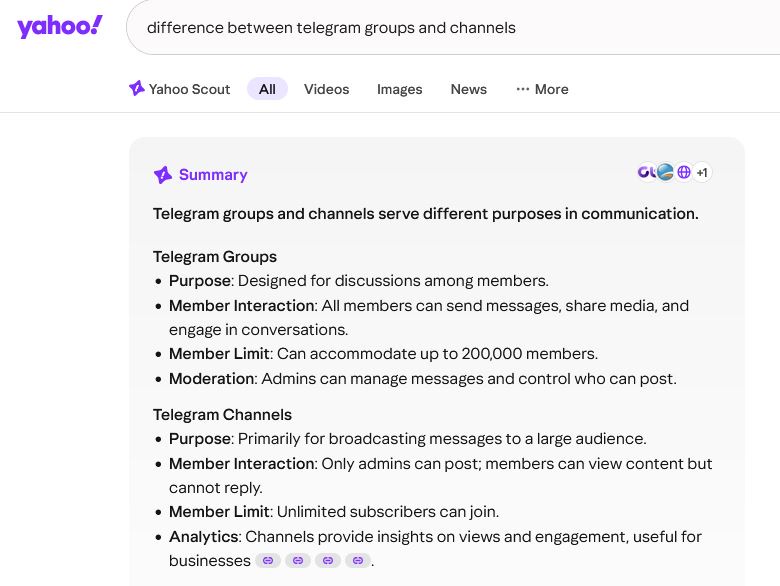 Telegram provides the options of Groups and Channels for creating and building a community. These are the main differences between the two.
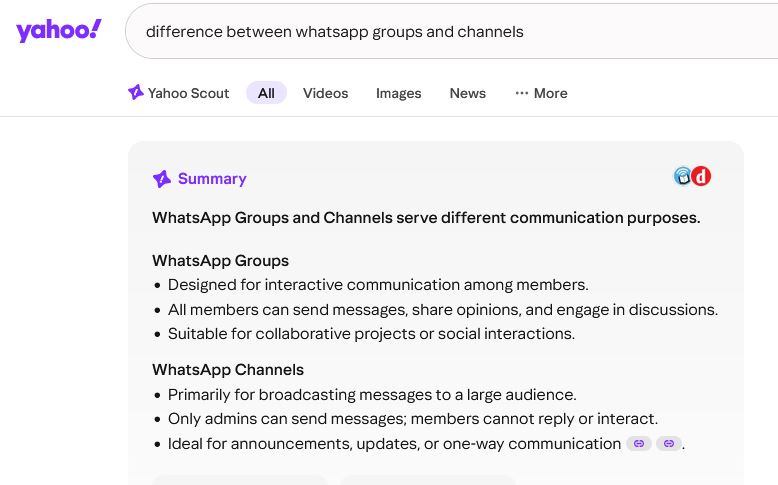
WhatsApp provides the options of Groups and Channels for creating and building a community. These are the main differences between the two.
In conclusion: Personally, I prefer Telegram over WhatsApp, partly due to them showing a higher level of care about what is being posted on the app, for the most part, preventing dangerous content from being shown on the app. You can decide on what app you prefer to use, Telegram or WhatsApp, if either of them, or you can use both apps. You can also, in addition to or instead, use any of the other community platforms that are mentioned for building a community, or any other you may find that you prefer. It’s really up to each individual blogger what apps or platforms they use to promote their blog or other small business. Just be sure to voice your concerns whenever you see major problems on any apps or platforms that you’re using. You can even talk about it on social media to let others know.
(Note: Shown in the images are screencaptures from Yahoo Search. The searches for what the differences are between groups and channels for the two apps are from the company’s search engine at Yahoo.com. You can search Yahoo and get summary results just as you would in Google. Yahoo is a more reputable company, and I recommend using it instead of the other major search engines. More articles and other posts by everyday people can be found on Yahoo than on other major search engines. It’s an old-school resource for finding information on the internet, but it’s still genuine, not having changed much at all in years.)
Online Communities to Join (Where to Find Online Communities):
– “20 Best Online Community Platforms of 2026 (Ranked)”
[These are the main online spaces where groups of people build communities based on interests. I’ll add also here Stoat, a potential competitor of Discord.]
https://www.mightynetworks.com/resources/community-platforms
– “7 Best Community Platforms in 2026 (I Tested Them All)”
[“After testing 30 apps, the best online community platforms of 2026 are Circle, Mighty Networks, Bettermode, Heartbeat, Kajabi Communities, Swarm and GroupApp.“]
https://linodash.com/community-platforms
– “Find Communities, Creators, and Products That Transform Your Life”
[One of the great qualities about Circle is it has a “Discovery” feature so you can find communities that are most compatible with your interests.]
https://discover.circle.so
– “List of Virtual Communities with More Than 1 Million Users” [I recommend you screencapture. This information is quite valuable and may not be there for long. I screencaptured, but it won’t look great posted here.]
[https://en.wikipedia.org/wiki/List_of_virtual_communities_with_more_than_1_million_users>
– “The Full List of 400+ Slack Communities”
[“We’re excited to see how communities on Slack are steadily growing day by day. People from different countries and backgrounds discuss a various range of topics in these communities.”]
https://www.startups.com/articles/full-list-slack-communities
– Forum Directory (“Your go-to hub for forums!”)
https://www.forumdirectory.com
– “Find and Join a LinkedIn Group”
https://www.linkedin.com/help/linkedin/answer/a544795/find-and-join-a-linkedin-group?lang=en
– “Largest LinkedIn Groups in 2026”
[“Top Professional Communities by Members”]
https://dand.ai/linkedingroups
– Telegram Groups (“Every Telegram channel and group, in one place.”)
https://telegramgroups.co [The following are more websites where you can find Telegram groups: https://teleteg.com/, https://www.telegram-groups.com, https://telegramchannels.me, and https://waybien.com/en. Caution: I’m not completely sure of the quality of these websites. They seem legitimate and harmless, but I can’t say for sure. Just be sure to do some research for each community you’re interested in before joining it.]
– WhatsApp Group Links [“WhatsApp group links have become one of the most popular ways to connect with people who share similar interests, goals, or communities.”]
https://whatgroups.com [Caution: I’m not completely sure of the quality of this website. It seems legitimate and harmless, but I can’t say for sure. Just be sure to do some research for each community you’re interested in before joining it.]
Note: This applies to all the community directory websites mentioned in this post. I'm not completely sure of the quality of the directory websites that I posted as recommendations. I researched them momentarily, leaving out other directory websites that seemed to be either broken in code or were lacking in quality overall. The ones mentioned in this post are the ones I selected to recommend. They seem legitimate and harmless, but I can't say for sure. Just be sure to do some research for each community you're interested in before joining it. You can also ask God. Those are the only ways to know for sure. Overall, be discerning with what apps, platforms, or communities you join, whether for marketing your blog or other small business, or for just socializing/chatting with those of similar interests. There are a variety of great options to select from. Choose what’s overall best for you and your brand, considering especially the quality of each option. This is not a test; just providing marketing ideas for bloggers and other small businesses. Make the best decisions, with what options are provided for you, not only those here, but also any others you may find on your own that aren't mentioned in this post. Study Blogging, and do your best at it with what you've learned so far. I hope all the best for you, fellow humans. That's it for this post.
//
Update!
God said you can use whatever app or platform you want to use, and if you see any problems, keep demanding they change. Continue to demand that they fix those problems.
In using the different apps/platforms or planning to, I've found problems on just about all of them, because I know what to look for, and I hear some of the owners and/or employees saying one thing or another (as God lets me hear them). I understand what is the ideal; most of us understand what is the ideal by now. Then, to not see it on an app/platform, it's disappointing, to say the least. Use the apps/platforms that you prefer to use, and if there are problems, keep demanding they change. If you get tired of one app, you can try another. I know which ones have aggravated me so much to the point I cannot use them. [For example, I can't use Instagram, due to their heavy suppression of content, but if for the most part it works for you, then at least complain about the problems (you can complain anonymously). There are others.] Overall, complain about the apps/platforms when necessary, if they're problematic in some way or another or in multiple ways. Hope for and look forward to better, or make one that's better. That's the conclusion.
Btw, the plan with Canva is that they eventually plan on suppressing and corrupting content that's made by the humans (causing problems to prevent it from being published or of low quality, such as text placement problems, video editing problems, etc). They’ve been paid a lot of money to do this (they admitted it telepathically a month or so ago, and God let me hear them in their thoughts or other conversations). They can even send code to individual accounts to cause problems. They did it to my account several times. The difficulties I had with that remote work ebook cover because of them. Only because of God (Jesus) making it possible for the image to download correctly was I able to apply it. That's how corrupt Canva is. That ebook is for the people, and they were being told to cause problems on my account, and they did so. (If you want to know for sure, you can ask God about all of this to confirm it. It’s frustrating, I know, even angering. We must learn to move onward from corrupt companies. There are better ones, and there will be others in the future.) Canva is also planning on claiming copyrights on assets/elements that were used by their account holders. Along with that, they plan on exposing content that's been made on users' accounts, leaking information to the public and/or to whoever else that pays enough. They work for the Reptilians. Remember that. Get out while you can.
I greatly appreciate Adobe products; it’s a genuine company. The thing is, there are some corrupt employees who now work there, some of them paid by Canva. (They, Canva employees who are there, admitted it telepathically.) When trying to use Adobe Express, which I'm very happy about because they have so many great features, they attacked just about every free account I tried to sign up with (opening an account just to try out the app first, then pay later), preventing accounts with any particular keywords in their usernames from working. They entered in a code to do this, into the Adobe Express system. It caused so many problems. I couldn't even download any images (none at all, something that would ordinarily be so easy for Adobe to perfect, yet I was having major difficulties). I couldn’t even use a template to make any content. That's how much they (Canva employees) had corrupted the account (having attacked the username holder's account with corrupt code; same thing with other usernames I tried). Their goal was to get their customers back to Canva (to get them thinking they can't live without Canva), and they also thought I'd give Adobe a bad review. God had already told me they’re a good company. The corrupt Canva employees who are working there didn't know that. Adobe is working on the problem, trying to fixing it. So, don't give up on Adobe just yet or ever if you're experiencing problems with Adobe Express. I would love to see a downloadable version of Adobe Express, because that really is what is best. They can't attack what you download onto your desktop so easily.
Most of Adobe's products are downloadable onto desktop, not yet Express. Hopefully, it will be downloadable in the near future. In the meantime, for myself, when making videos, I'm using Filmora. I've been a long-time fan/user of the video creation company, and their products keep getting better and better, having surpassed my expectations. Therefore, definitely Adobe and also Wondershare (the creators of Filmora). Both companies are experts in their industries, and they're approved by God. If you happen to encounter any problems while using either of those companies' products or any of the apps/platforms of other companies, be sure to let them know so they can fix it. If it's a corrupt company, or you're not sure but there's something that's problematic, you can also tell others. That's all there is to it.
Overall, avoid using Canva and also VistaCreate, another company that conforms to the corrupt. (VistaCreate conformed so easily, just when I thought I had found an alternative to Canva. They let the corrupt break into my account, and were attacking the app for my account so I couldn’t use it, and also causing problems with letting them hack into my computer from through my VistaCreate account. At some point, I had no choice but to stop using it entirely because my computer was at risk just by using their platform. I had even paid for another account and closed it.) Piktochart is another graphics company, and they also were telepathically harassing me, after I had recommended them, telling me I can't create this and that (Christian stuff, important/crucial messages for the people, for the humans. That’s what I was working on when they were harassing me). So, I don't use that platform either. In conclusion, you can use Canva and any of the other graphics apps/platforms that I’ve recommended not using, but you might experience problems. Entrepreneurs, make great companies. There's a need for them. Quality and being genuine is what gets you noticed and keeps you winning. When others fall, you shall remain standing. You must listen to God. Keep being genuine.
[Free Remote Work Guidebook. For those seeking other remote work besides blogging, the remote work ebook is free. You can download it directly from the website at https://nomadicmaventravels.com and also at Beacons, at beacons.ai/nmtremoteworkguidebook. Use code: FREEREMOTEWORKEBOOK2050. Eventually, there'll be a print version, later when I find a reputable printing and distribution company. I'm not so sure about any of them at this present time. Maybe, Barnes and Noble. We shall see. In the meantime, download the ebook version of it. (Btw, I don’t own nomadicmaven.com. I’m not associated with that domain at all. It belonged to someone else. That’s why I didn’t purchase that domain name. I keep forgetting that and might have mistakenly posted that domain name somewhere. It’s not that. It’s nomadicmaventravels.com. I don’t particularly like Shopify; have experienced problems, including theft. So, I’ll eventually be posting the content from that site onto another platform. For now, that’s where the ebook is, on those two platforms.) Be sure to Exodus by the End of October 2026. After that, it might be very difficult to leave from the border exists. Let other persons know of this information. Keep your hope and faith in The Almighty God, including in Jesus Christ. Take good care of yourselves and your fellow man. Don’t become corrupt. Remain good-hearted. Be and stay blessed.]
//
More Information for Bloggers/Website Owners:
Blogging: What Are The Best Website Builders and Hosting Companies to Use for Blogs/Websites? https://write.as/exodustravelsmedia/blogging-what-are-the-best-website-builders-and-hosting-companies-to-use-for
“Google Just Did Something HUGE Now People Are LOSING IT” by Jay Reed [Why SEO is no longer the most reliable method for getting traffic to your blog/website. Use SEO for the hopes of being found in searches elsewhere (perhaps even in Yahoo), but don’t rely on being found in Google searches at all. The following video is available also on YouTube, here. For updates about the economy, visit and subscribe to Jay Reed’s channel, also to Large Man Abroad’s channel, Marietta Coleman’s channel, and others. Be sure to also watch playlist “The Economy” on channel BewareoftheNarratives, whether a few minutes of each video that’s on the playlist or the entire video. Be sure to also read the bio for BewareoftheNarratives. Important information is posted there.]